Understanding Aspect Ratios: A Guide For Social Media Video Editing
These days, you can’t foster any sort of internet presence without diving into social media. It’s the new world we live in and it has truthfully taken over. So you can either ride with the wave or be swept away. Okay, I’m not saying that there aren’t other forms of marketing, in fact, I’ll always swear by the power of print, but that’s another blog.
Whether it’s for a personal or a corporate brand, social media will come about. And even more specifically, video will be inevitable.
So if you’ve finally caved into creating digital content for your social media channels, there’s one big thing to consider: Aspect Ratio. I consider this the golden rule for posting videos to social media. Let’s get into it.
Edit with The Platform’s Recommended Aspect Ratio in Mind
Whether it’s Facebook, YouTube, or Instagram, you need to make sure that you are editing a video in the right aspect ratio. But what is an aspect ratio?
The Aspect Ratio is the orientation of your video; the proportional relationship between the width and height of a video frame.
A standard video that you’d see is 16:9 (1920 pixels by 1080 pixels), essentially “a horizontal rectangle.” But not every social media channel calls for this.
Since the merger of Facebook and Instagram, reels are taking over the world! Reels are the short-form content that you see on these platforms. But what have you noticed about reels? They are not “horizontal rectangles,” they are “vertical rectangles.” This aspect ratio is the opposite, 9:16 (1080 pixels by 1920 pixels). The same goes for YouTube shorts. So let’s break it down by social media platform:
Facebook:
Standard Video Post: 16:9 (1920 pixels x 1080 pixels)
Facebook Reel: 9:16 (1080 pixels x 1920 pixels)
Instagram:
Instagram Reel: 9:16 (1080 pixels x 1920 pixels)
Instagram Stories: 9:16 (1080 pixels x 1920 pixels)
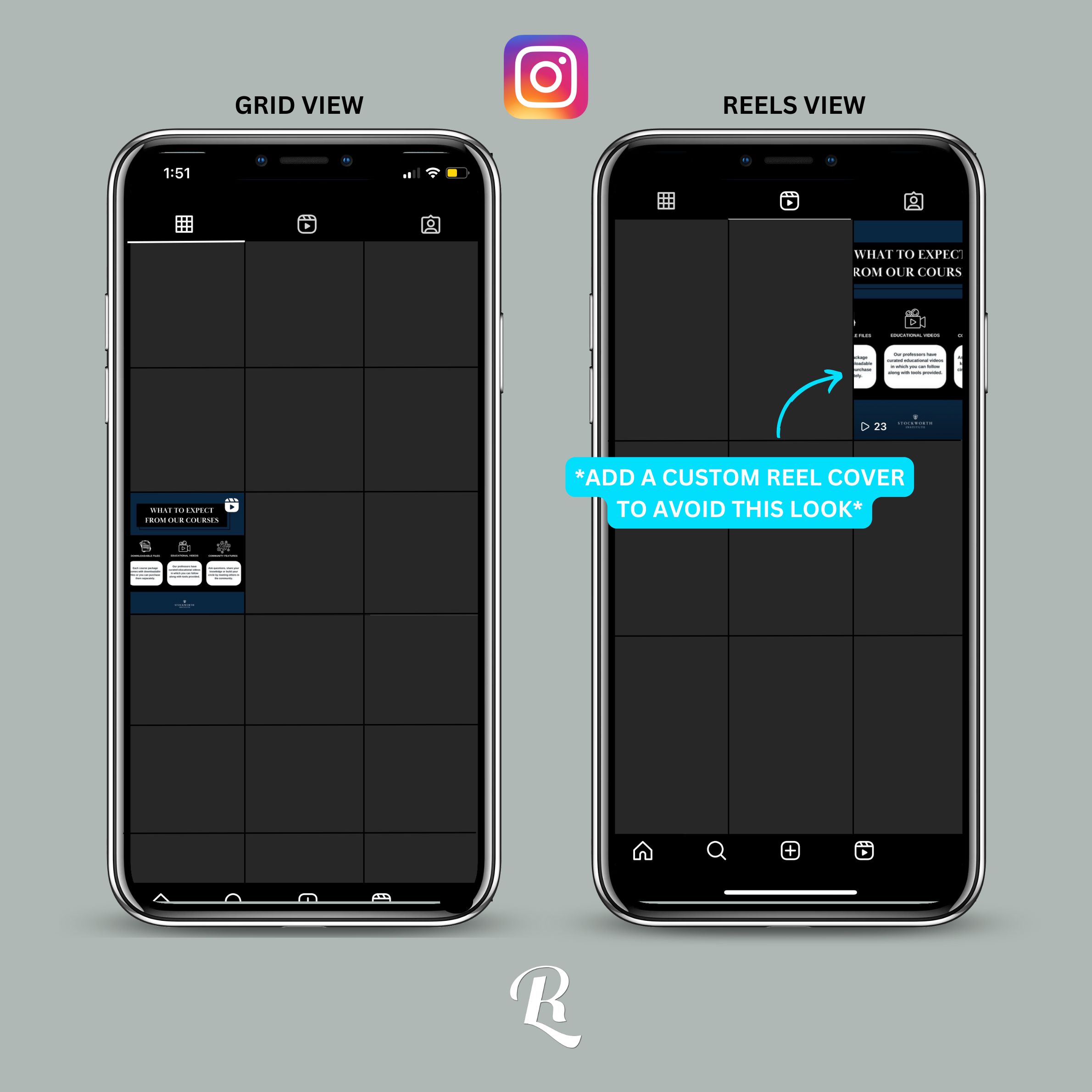
One thing to note with Instagram, all videos on Instagram are now considered reels. That doesn’t mean you can’t post a standard 16:9 (1920 x 1080) video or a 1:1 (1080 x 1080) video, it just might look a bit different. And if you were to do this, I’d recommend creating a custom reel cover because if you don’t, Instagram will just expand your video to fit 9:16 and they’ll use that as your reel cover. Yikes! See below:
YouTube:
YouTube Videos: 16:9
Full HD: 1920 pixels x 1080 pixels
4K: 3840 pixels x 2160 pixels
YouTube Shorts: 9:16 (1080 pixels x 1920 pixels)
Linkedin:
Linkedin Video Posts: 16:9, 9:16, 4:5, 1:1
TikTok:
TikTok Videos: 9:16 (1080 pixels x 1920 pixels)
If you’re not familiar with the video world, let’s take a look at what each aspect ratio looks like:
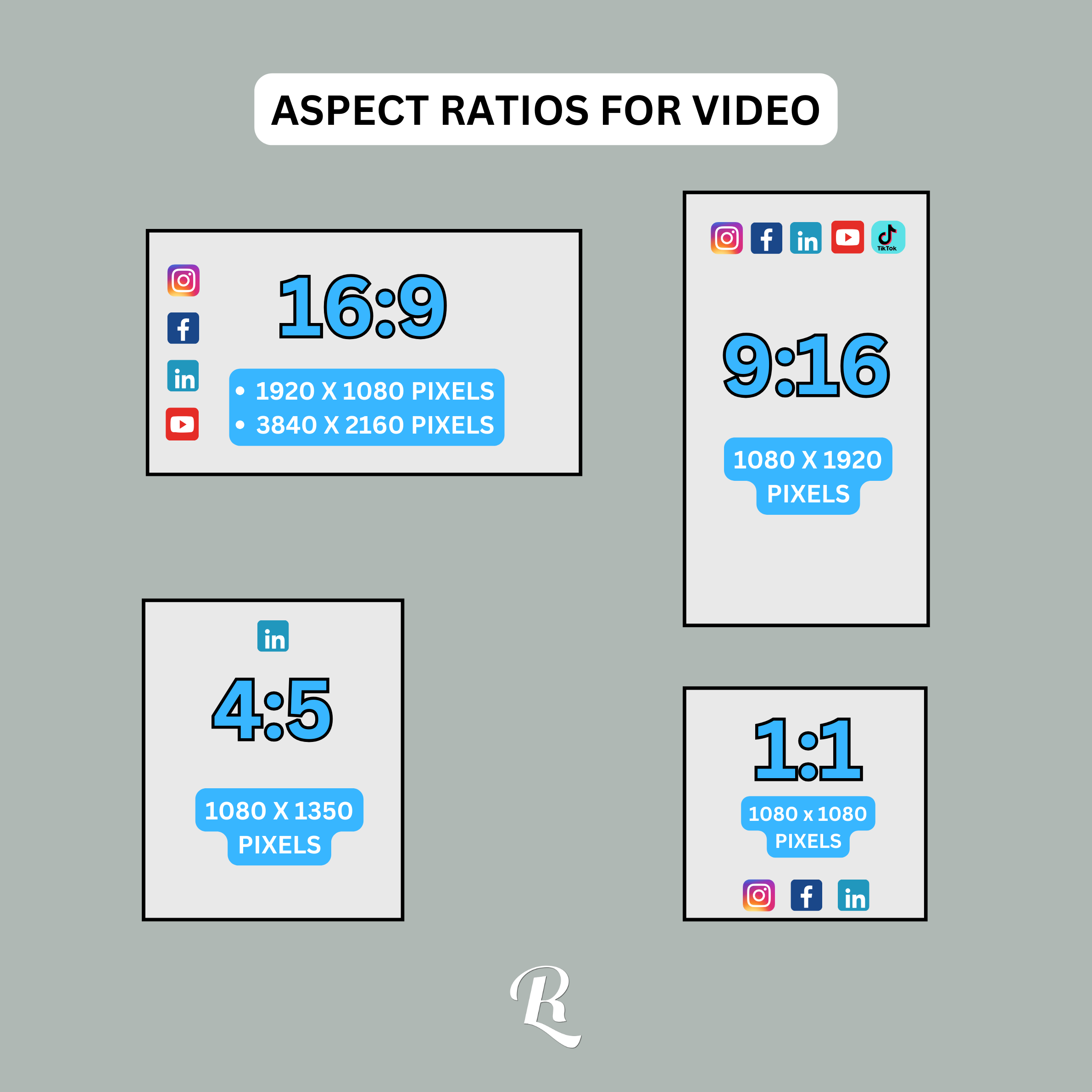
Now, I know that there might be a few other aspect ratios that these platforms would “accept,” but these are the ones that everyone is using on a daily basis. These are my recommendations. In fact, I don’t really know many folks who use the aspect ratio 4:5 anymore, but I know that there are these kind-of posts out there on Linkedin. So I will acknowledge it in this blog.
Next, when editing and posting videos on social media, it’s also important to plan ahead. You should decide on your aspect ratio before even shooting. Whether you film content yourself or hire a videographer, this knowledge is gold! Knowing this ahead of time will prevent awkward cropping and ensure your content fits seamlessly into the chosen platform. Videographers will also thank you! Your desired outcome could determine how a videographer shoots your content.
Finally, you should always test and preview your post! Before finalizing, work diligently in your drafts and take advantage of the preview options. Or pretend to schedule it so that you can see what it would look like in your feed. This helps catch any unexpected cropping or formatting issues.
I truly believe that this area of video editing can make or break your video! I’ve made countless mistakes, assuming my final video wouldn’t be cropped, and it was, all because I edited my video in the incorrect aspect ratio. It’s devastating when a video goes out to the world, gains a couple of likes and comments, and then you realize it doesn’t look the way you had envisioned it. So make sure your settings in your video editing software are correct from the get-go, change your timeline to the proper resolution and aspect ratio.
All that to be said, I hope this was helpful! I want to make sure that all of my findings over the years are digestible for you. Whether you’re new to video editing or content creation, this blog was designed with you in mind. Thanks for reading! If there are any specific topics, you’d love for me to dive in on, comment below!