Mastering Thumbnails: Impact and Limitations on YouTube & Instagram
We’ve all been on first dates and we’ve all been in interviews. The common denominator amongst all first-time experiences with another human being is our impressions. Your first impression counts and if you’ve made a good one, you’ll know it.
The same thing goes for Social Media Thumbnails. Whether it’s a YouTube Thumbnail, an Instagram Reel cover, or even the tagline on your TikTok Cover, deciding on a creative cover should be weirdly prioritized, here’s why. Think of your thumbnail as real estate.
Let’s start with YouTube, on YouTube you have this tiny rectangle that’s 1280 pixels wide and 720 pixels tall. Miniscule. And it’s your job to fill every bit of it to ensure that that tiny rectangle will tell a viewer everything they need to know about your video. Being a video editor and a producer, I know how much time you put into producing, editing, and publishing your video. So don’t kick yourself just because you were lazy on one of the final steps to sending your video out into the world. On your thumbnail, it’s important that your graphic tells the audience three things:
Brand Identity: Who’s in your video or who are you?
You can do this by simply putting a face to your name or simply have your name or logo, somewhere. You need to start establishing a consistent brand.
Topic: What is your video about?
This is obvious. Thinking of a catchy title is great, but it’s also important to not create any confusion about your video's subject matter. Draft some broader titles, and then go from there until you’ve gotten so specific that no one could question your topic.
Here’s an Example:
Don’t: 3 Tips on Video Editing
This is way too broad
Do: 3 Tips on Color-Correcting SLog Footage in Davinci Resolve
Now you have specified what you’re focusing on in the edit, what type of footage you are coloring, and what video editing software you’re using,
Why: What gift are you giving to the audience? Why should they watch you?
This goes hand and hand with your topic. You need to make sure that you’re thinking about your audience above all else. If your goal is to make their lives easier by watching this video, make that clear in your title. What will they leave with after watching your video?
My advice for YouTube Thumbnails, use every bit of it and make it pop. Over time, you’ll want to create a consistent theme with your thumbnails, so that your channel stays aesthetically pleasing. And finally, do NOT let YouTube pick a random shot from your video to use as a thumbnail. This is so offensive to all of the work you’ve put in! Even if you’re not a graphic designer, download Canva for free and create a simple graphic from their templates. Another pro tip: Just use your same YouTube Thumbnail if you’re posting to Facebook. Facebook uses similar dimensions.
Now, Instagram. This one is tricky. Your reel cover should be 1080 pixels by 1920 pixels, a vertical rectangle. The same few tips for YouTube Thumbnails apply to Instagram, but here you have a little bit more flexibility. Here’s why. Everyone and anyone cares about the aesthetic of their profile or “grid-view.” This is where your reel cover will come into play. You’ll want your reel cover to look great on your profile, or at the very least match the style of your profile. So if you’re in a rush and can’t make a custom graphic for your reel cover, pick a nice photo that has to do with your reel. But here’s the catch: You need to make sure that whatever you choose as a reel cover, will look good in your grid because remember, reel covers are vertical rectangles, but your profile consists of “square” previews. If you’re on mobile, Instagram will luckily let you choose which part of your reel cover you want to show in your grid. So whether or not you have text in your Reel Cover, being able to drag which part of the cover appears in your grid is clutch.
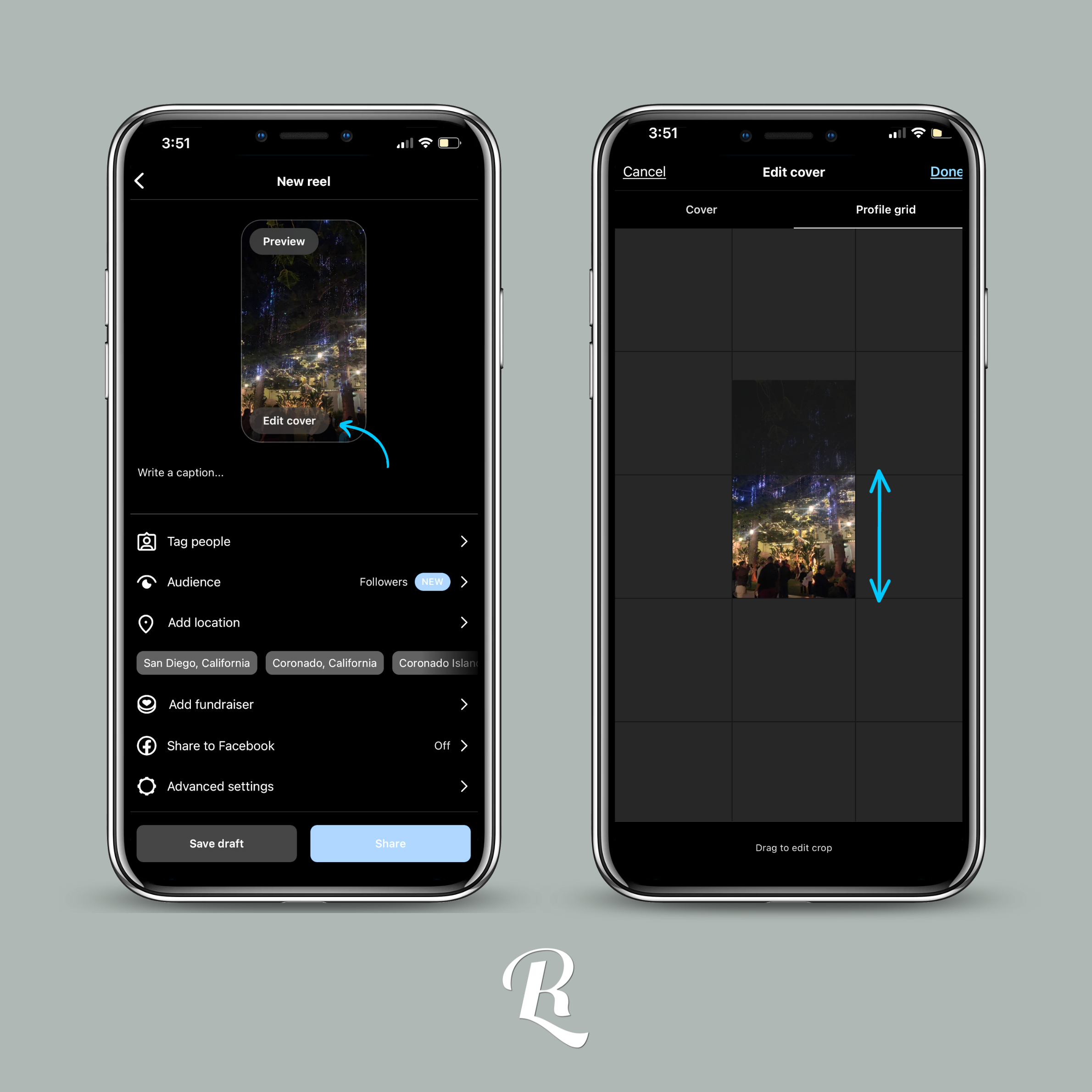
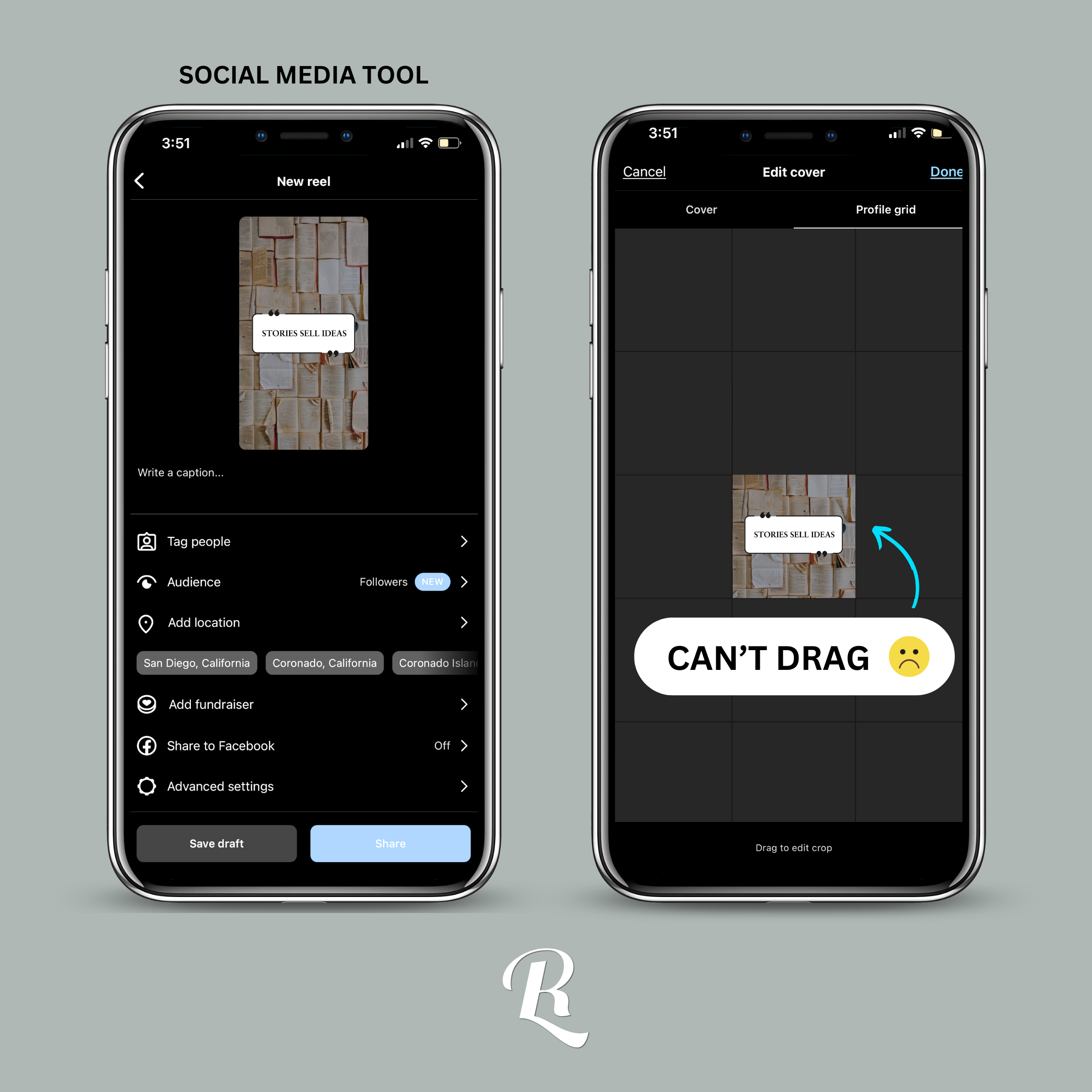
Here’s the unfortunate caveat: if you’re using a Social Media Planning Tool like Meta Business Suite, Metricool, Hubspot, etc. you’re going to want to make sure that any text or main part of your custom Reel cover is centric. These social media tools will automatically choose the center of your Reel Cover for your grid cover and you cannot change it. So to be safe, I create all my Reel Covers with that in mind. I make sure I choose a nice wide photo with most of its contents in the middle and then I always place text smack in the middle.
All that to be said, I hope this was helpful! Often times, we look over the final steps to posting content because we’re in such a rush to just get it out there, but if you want to get the most exposure you need to pay attention to the details. Whether it’s a long-form video or a short reel, it’s important to spend time on your thumbnail. You wouldn’t buy a book without reading the cover.
If you enjoyed reading this and would love to see more, comment below! The blog world is fairly new to me, but I have realized all of the knowledge I have learned over the past few years means much more when shared with others!